

Audit-ready means your financials, controls, and supporting evidence are organized and documented well enough to hand over on request, with nothing reconstructed at the last minute. The single most important move is appointing one internal audit coordinator and starting a formal 8 to 12 week preparation timeline now, referencing PCAOB and FASB standards along with last year's findings as your baseline.
TL;DR:
- Most organizations underestimate the time needed for audit preparation, and starting a formal 8 to 12 week process significantly reduces findings and delays.
- Building a comprehensive, organized PBC list and maintaining a master tracker can prevent last-minute scrambles and streamline data collection.
- Automating routine tasks like reconciliations and evidence gathering helps maintain continuous audit readiness and minimizes manual errors.
- Clear ownership of each PBC item, led by a dedicated internal coordinator, avoids miscommunication and speeds up responses during fieldwork.
- Regularly remediating prior-year findings and treating audit readiness as an ongoing discipline enhances efficiency and reduces last-minute surprises.
Table of Contents
- Audit Readiness Checklist: The Master PBC Document List
- How Long Does Audit Preparation Actually Take?
- Building the PBC Package: Organization Standards That Save Time
- What Evidence Do Auditors Actually Want for Internal Controls?
- Reconciliations and Schedules: Making Every Number Traceable
- Preparing IT Evidence: Logs, Access, and Data Integrity
- Documenting Risk, Governance, and Prior-Year Findings
- Who Owns What: Avoiding the Many-Cooks Problem
- Self-Assessment Scoring: Where to Focus Remediation First
- Managing Fieldwork Day One and Auditor Requests
- Using Automation to Keep Evidence Collection Continuous
- What I've Learned Watching Firms Prepare for Audits
- A Faster Path: Automating Your Way to Audit Readiness
- Sources
Audit Readiness Checklist: The Master PBC Document List
The "Prepared by Client" (PBC) list is the backbone of every external audit. It's the master inventory of documents your auditor will request before they set foot in your office, whether physical or virtual, and having it staged in advance is what separates a smooth engagement from a chaotic one.
A well-organized PBC list typically groups documents into five buckets. Print this, assign it to your coordinator, and start checking boxes today.
Core financial records:
- Trial balance and general ledger detail for the full fiscal year
- Bank statements for all accounts, with completed reconciliations
- Financial statements (income statement, balance sheet, cash flow statement)
- Chart of accounts with any mid-year changes documented
Balance-sheet supporting schedules:
- Accounts receivable and accounts payable aging reports
- Fixed asset rollforward showing additions, disposals, and depreciation
- Debt agreements, loan covenants, and related amortization schedules
- Inventory count records and valuation methodology, if applicable
Revenue and payroll:
- Signed revenue contracts and any side letters affecting recognition
- Payroll registers, tax filings, and benefits reconciliations
- Commission or bonus accrual calculations
Governance and legal:
- Board and committee meeting minutes for the audit period
- Corporate bylaws and any amendments
- Insurance policies (general liability, D&O, cyber)
- Litigation summaries or legal contingency disclosures
IT and vendor records:
- User access logs and change-management records for financial systems
- Key vendor contracts, especially those tied to revenue or major expenses
Pro Tip: Build your PBC tracker as a living spreadsheet with columns for document name, owner, due date, and status, then share it read-only with your audit firm. Auditors spend less time chasing updates when they can see progress themselves, and that visibility alone tends to shorten the number of follow-up emails you get in week two.
Missing even one category here is what typically triggers the frantic, week-of scramble everyone dreads. Build the list once, and reuse it every audit cycle with minor updates.
How Long Does Audit Preparation Actually Take?
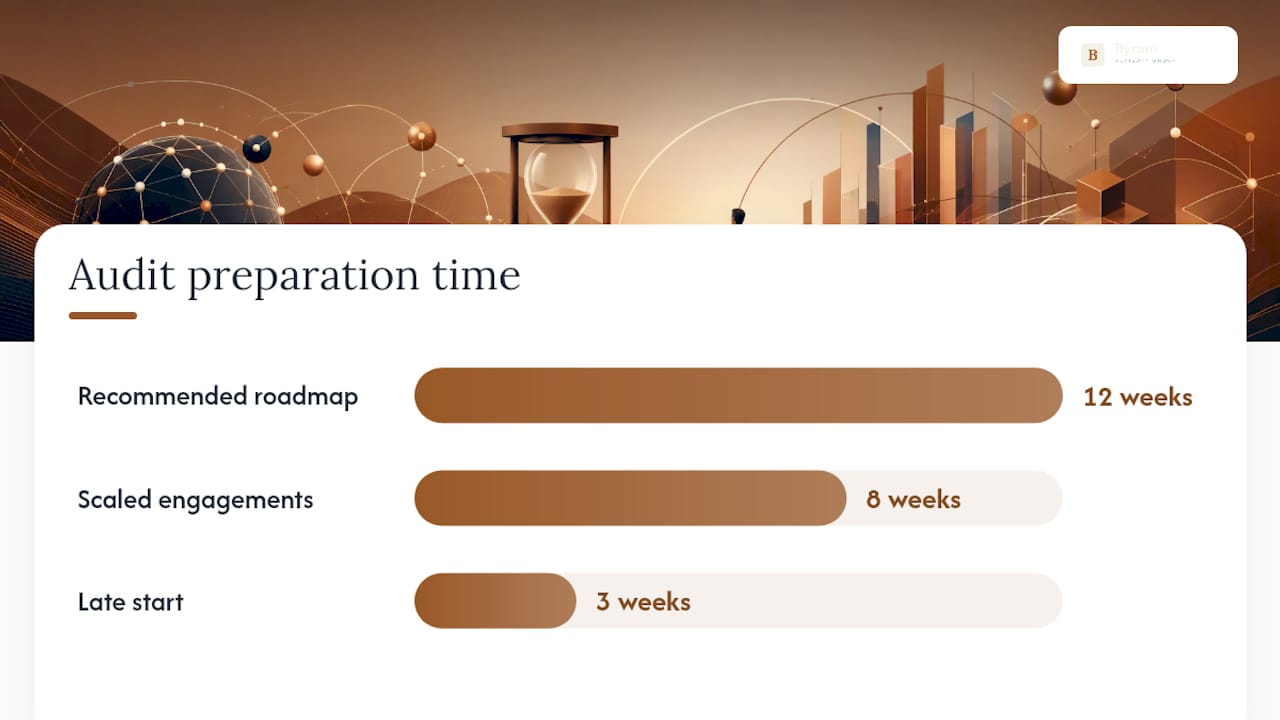
Most controllers underestimate this badly. Organizations that wait until two or three weeks before fieldwork to start preparing see measurably more findings and more delays than those working a formal, phased runway.
A 12-week roadmap, scaled down to 8 weeks for smaller engagements, breaks into three clear phases:
- Weeks 12 through 8: Scope and assign. Confirm audit scope with your engagement partner, appoint your internal coordinator, and distribute a self-assessment scoring questionnaire (more on that tool below) to every department touching financial data. Any weak areas flagged here go straight into a remediation plan with named owners and deadlines.
- Weeks 8 through 4: Collect and reconcile. This is the heavy-lifting phase. Teams pull PBC documents, complete month-end reconciliations for every major balance-sheet account, and run preliminary control testing so surprises surface now instead of during fieldwork.
- Weeks 4 through 1: Review and stage. Your coordinator performs a quality pass on every file, finalizes the PBC package, sets up a secure delivery portal, and briefs staff on what to expect during fieldwork. A short "day one" checklist gets circulated so nobody is caught flat-footed on the opening call.
The math here matters more than it looks: a 90 to 120 day runway gives you roughly two to three weeks of buffer for the inevitable document that's harder to locate than expected, a reconciliation that doesn't tie out on the first pass, or a stakeholder who's traveling the week you need their sign-off. Compress that timeline to three weeks and you lose the buffer entirely, which is exactly when findings start piling up.
Building the PBC Package: Organization Standards That Save Time
Collecting documents is only half the job. How you organize and deliver them determines whether your auditor spends their time verifying evidence or hunting for it, and the second scenario burns billable hours you're paying for either way.
Start with a master document tracker that mirrors your auditor's exact PBC numbering. If their request list numbers items 1 through 47, your folder structure and tracker should use those same numbers, not your own internal categorization. Every file name should follow a consistent pattern, something like "PBC12_BankRecon_December2025.pdf" rather than "bank stuff final v3."
Your folder structure should include:
- A top-level folder per PBC category, numbered to match the auditor's request list
- A "working papers" subfolder for reconciliation backup and calculation support
- A "correspondence" folder logging every question and response exchanged with the audit team
- A "signed approvals" folder holding the evidence covered in the next section
For delivery, a secure client portal or encrypted file-sharing platform beats email attachments every time. Auditors deal with sensitive financial data across dozens of clients, and most engagement letters now specify minimum security expectations, typically encryption in transit, access logging, and role-based permissions. If your firm doesn't already have a portal, ask your audit team which platform they prefer before building your own workaround.
What Evidence Do Auditors Actually Want for Internal Controls?
Having a written policy is not the same as proving the control worked. Auditors have shifted hard toward requiring proof of operating effectiveness, meaning documented artifacts that show a control was performed, not just designed.
Here's how common controls map to the evidence auditors will ask to see:
- Approval controls (purchase orders, journal entries) need approval emails, signed forms, or system-generated approval logs with timestamps
- Access controls need user access reports, periodic access reviews, and termination checklists showing access was revoked promptly
- Change management controls need system change tickets, testing sign-offs, and deployment approvals
- Reconciliation controls need the reconciliation itself, plus preparer and reviewer signatures or system sign-off stamps
- Segregation of duties needs role matrices showing who can initiate versus approve versus record a transaction
To document control testing before fieldwork begins, pick a sample of transactions for each key control, walk through the evidence trail yourself, and note any gaps. If your accounts payable approval control requires sign-off above $5,000 but you find three unsigned approvals in your sample, that's a finding you want to catch and remediate in week six, not one your auditor catches in week one of fieldwork.
Pro Tip: Prioritize testing controls tied to your highest-dollar accounts and any area flagged in last year's management letter. A perfectly documented petty cash control does nothing to offset a weak revenue recognition control, so triage your testing effort by dollar exposure and prior-year risk, not alphabetical order.
Quick remediation for common gaps usually means tightening an approval threshold that's been ignored, adding a monthly access review where none existed, or simply starting to save approval emails to a shared folder instead of letting them live in someone's personal inbox.
Reconciliations and Schedules: Making Every Number Traceable
Every major balance-sheet account needs a reconciliation that ties directly to the trial balance, with enough backup that a reviewer can trace each number to its source without asking you a single question.
The accounts that draw the most auditor attention are:
- Bank reconciliations for every account, current through the audit period end date
- Accounts receivable aging, reconciled to the AR subledger and the general ledger
- Accounts payable completeness testing, confirming no unrecorded liabilities slipped through at period end
- Fixed asset rollforward, showing beginning balance, additions, disposals, depreciation, and ending balance
- Payroll reconciliations, tying payroll register totals to the general ledger and payroll tax filings
A complete reconciliation file includes the reconciliation schedule itself, every supporting document referenced in it (bank statements, subledger reports, invoices), and a visible preparer and reviewer sign-off with a date. Missing that sign-off is one of the most common findings auditors flag, not because the math is wrong, but because there's no evidence anyone checked it.
The most frequent reconciliation problems are stale reconciling items that never get cleared, unexplained variances written off as "immaterial" without documentation, and reconciliations prepared but never reviewed by a second person. Fix these by setting a hard rule: no reconciling item stays open longer than two months without a documented explanation, and every reconciliation gets a named reviewer before it's considered closed.
Preparing IT Evidence: Logs, Access, and Data Integrity
IT general controls testing has become a standard part of nearly every financial statement audit, and it's the section most finance teams underprepare for because it falls outside their usual wheelhouse.
Auditors typically request:
- User access logs for financial systems covering the full audit period, not just a snapshot
- A list of terminated employees with proof their system access was revoked within a reasonable window
- Change-management tickets for any modification to financial reporting systems, including testing and approval evidence
- System configuration documentation, especially for automated controls like three-way match or approval workflows
- Backup logs and disaster recovery test results showing data can actually be restored
Pull these logs early. Many systems only retain detailed audit trails for 90 to 180 days by default, so if your fiscal year ended nine months ago, you may need to request an extended export before the data ages out or gets purged. Coordinate with IT now, not during week two of fieldwork.
To demonstrate audit-trail integrity, show that logs are generated automatically by the system rather than manually compiled, that access to modify those logs is itself restricted, and that backup retention policies meet or exceed your audit period. A one-page summary of your backup schedule and last successful restore test goes a long way toward reassuring an IT auditor who's reviewing a system they've never seen before.

Documenting Risk, Governance, and Prior-Year Findings
Prior-year findings are the single best predictor of where this year's auditor will focus first. If a finding isn't fully remediated with documented evidence, expect it to resurface, often with sharper scrutiny.
For each prior-year finding, document the root cause, the specific remediation action taken, evidence that the fix is actually working (not just that it was implemented), and a named owner responsible for ongoing monitoring. A finding closed on paper but with no evidence of sustained effectiveness tends to reopen fast.
Your risk register should map key risks to the controls designed to mitigate them and the evidence proving those controls function. Keep it simple:
- List each significant risk (revenue misstatement, unauthorized access, inventory obsolescence)
- Note the control addressing it
- Link to the evidence file proving that control operated during the period
Board minutes should reflect that governance is actually happening, not rubber-stamping. Auditors want to see discussion of financial results, risk oversight, and any related-party transactions or unusual items addressed at the board level. Thin minutes that just list attendees and a vote count raise more questions than they answer.
Who Owns What: Avoiding the Many-Cooks Problem
Nothing slows an audit down faster than three different people answering the same auditor question with three different answers. A single internal audit coordinator consolidates every request, controls the master tracker, and reviews files before they go out the door.
The coordinator's core responsibilities:
- Own the master PBC tracker and update status daily during active fieldwork
- Serve as the sole point of contact for the audit team, routing questions to the right internal owner
- Review every document for accuracy and completeness before it's submitted
- Escalate blockers to leadership before they become deadline problems
Beyond the coordinator, every PBC item needs a named owner, not a department. "Finance team" is not an owner; "Maria Chen, Senior Accountant" is. Set a clear internal SLA, something like 48 hours to respond to a standard auditor request and 24 hours for anything flagged urgent, so nothing sits untouched in an inbox while the clock runs on fieldwork.
Self-Assessment Scoring: Where to Focus Remediation First
Not every gap deserves equal urgency. A green, yellow, red scoring model across your major readiness pillars turns a vague sense of "we're mostly okay" into a prioritized action list.
Score each pillar from 0 to 10 based on completeness and documentation quality, then total the results.
| Readiness Pillar | Green (8 to 10) | Yellow (4 to 6) | Red (0 to 3) |
|---|---|---|---|
| PBC documentation | All items collected and organized | Most items collected, some gaps | Major categories missing |
| Internal controls evidence | Full evidence trail for key controls | Partial evidence, some manual gaps | Policies exist, little operating evidence |
| Reconciliations | All major accounts reconciled and signed off | Most reconciled, some unresolved items | Multiple accounts unreconciled |
| IT and access controls | Logs pulled, access reviews current | Logs available, reviews overdue | No formal access review process |
| Governance documentation | Minutes complete, risk register current | Minutes exist, risk register outdated | Minimal governance documentation |
A total score above 40 out of 50 generally means you're on track for a smooth engagement. Scores between 25 and 39 call for a focused four-week remediation sprint on your red and yellow pillars. Anything under 25 signals you need to push your fieldwork date if at all possible, or bring in outside help immediately.
Managing Fieldwork Day One and Auditor Requests
The opening meeting sets the tone for the entire engagement. Include your audit coordinator, controller or CFO, and any department leads whose areas carry significant risk exposure, then walk through the PBC status, confirm the fieldwork schedule, and flag any known gaps upfront rather than letting the auditor discover them.
For managing the request flow during fieldwork:
- Triage every new request within four hours: assign an owner, confirm feasibility of the deadline, and flag anything requiring executive input immediately
- Log every request and response in the same tracker used during prep, so nothing gets answered twice or missed entirely
- Set a daily 15-minute standup with your coordinator and key owners during active fieldwork to close open items before they age
- Push back respectfully on unclear requests rather than guessing; a clarifying question now saves a wrong deliverable later
Closing items fast keeps momentum on your side. An audit that drags because open items pile up unanswered costs you more in fees and more in credibility than one where every request gets a same-day acknowledgment, even if the full answer takes another day to compile.
Using Automation to Keep Evidence Collection Continuous
Most of the work described above is repetitive by nature: pulling the same reports, renaming the same file types, chasing the same approval emails every quarter. That repetition is exactly where automation earns its keep.
Process orchestration platforms turn audit prep from an ad hoc document hunt into a structured workflow that assigns owners automatically, validates submissions against a checklist, and reduces the back-and-forth follow-ups that eat up a coordinator's week. Enforced file naming and metadata at the point of upload means nobody has to hunt through a shared drive later wondering which version is current.
A few automation wins worth implementing before your next audit cycle:
- Automate invoice-to-payment matching so approval evidence is captured at the transaction level, not reconstructed afterward
- Build a centralized evidence repository that timestamps every upload automatically, eliminating manual file naming errors
- Schedule recurring reconciliations so bank and subledger balances are checked monthly instead of scrambled together at year-end
Pro Tip: The firms that struggle least during audits are the ones that treat readiness as a continuous state, not a seasonal project. If your systems capture approvals, logs, and reconciliations automatically all year, your PBC package is essentially assembled by the time your coordinator sits down to review it.
If you want a structured starting point, Byram-advisory's Field Guide walks through exactly how firms are applying automation to close the gap between "we have a policy" and "we have proof it worked."
What I've Learned Watching Firms Prepare for Audits
The firms that sail through fieldwork almost never have the fanciest tools. They have one person who owns the process, start early, and treat prior-year findings as a to-do list instead of a memory to forget. The teams that struggle are usually the ones spreading ownership across five people who each assume someone else is tracking the master list.
If there's one habit worth stealing, it's this: stop treating audit prep as a once-a-year fire drill and start treating it as a standing discipline, the same way you'd treat monthly close. The gap between those two mindsets is the real difference between a three-week scramble and a two-day fieldwork visit with almost nothing outstanding.
For teams ready to build that discipline into their actual workflow rather than just their intentions, the Field Guide is a solid next stop.
— Owen
A Faster Path: Automating Your Way to Audit Readiness
Spreadsheets and shared drives can get you audit-ready, but they demand constant manual upkeep, someone renaming files, someone chasing approvals, someone rebuilding the same reconciliation template every month. Byram-advisory built its approach around a different premise: your accounting software should already be generating most of this evidence as a byproduct of normal work, not as a separate project every time an audit rolls around.

The Peregrine platform integrates directly with QuickBooks and similar systems to automate repetitive tasks like transaction matching, reconciliations, and anomaly flagging, so the evidence trail your auditor wants is already organized by the time fieldwork starts. For firms that want to see the approach before committing to a platform, the Field Guide to AI for Accounting Firms is free and walks through the same automation principles in practical detail. Firms ready for a self-paced, hands-on path can also start with the DIY implementation course. If you're ready to see what a continuously audit-ready workflow actually looks like, explore Byram-advisory's platform and book a walkthrough.